Best Minecraft Texture Packs (Java and Bedrock)
Last updated: October 2026 | Covers Minecraft 26.3 (Java) and 26.52 (Bedrock)
The best Minecraft texture packs in 2026 are Fresh Animations, Motschen’s Better Leaves, Dramatic Skys, Faithful 64x and Bare Bones. All five are free, actively maintained, and change how the game looks without changing how it plays. Fresh Animations is the most downloaded resource pack ever made, at over 47 million downloads.
One thing to settle first, because most “best texture packs” lists skip it: nearly every pack below is for Java Edition. If you play on Android, you are on Bedrock, and Bedrock uses a different pack format. The Bedrock section covers what works for you.
Texture pack or resource pack?
You will see both terms. “Texture pack” is the older name and what most people still search for. “Resource pack” is the current term, and it is broader – a resource pack can change textures, sounds, fonts, menus and animations, not just block surfaces.
In practice they mean the same thing today. Everything below is technically a resource pack.
Best Minecraft texture packs
Download counts below are from Modrinth as of October 2026 and keep climbing. The version column matters – a pack built for an older version may not work on the current release.
1. Fresh Animations – 47.3M downloads
By FreshLX. The most downloaded resource pack in Minecraft, and the one most likely to change how the game feels rather than just how it looks. It rebuilds mob animations so creatures move with far more character – heads that track you, more natural walking, idle movements that make mobs seem alive instead of sliding around.
Check its requirements before installing. Animation packs of this kind usually need an additional mod to work properly, and the pack page lists exactly what.
2. Motschen’s Better Leaves – 20.0M downloads
By Motschen. A small change with an outsized effect: leaf blocks become fuller and bushier instead of flat cubes, so forests look like forests. It is deliberately lightweight and built to stay compatible with other packs and mods, which is part of why it is so widely installed.
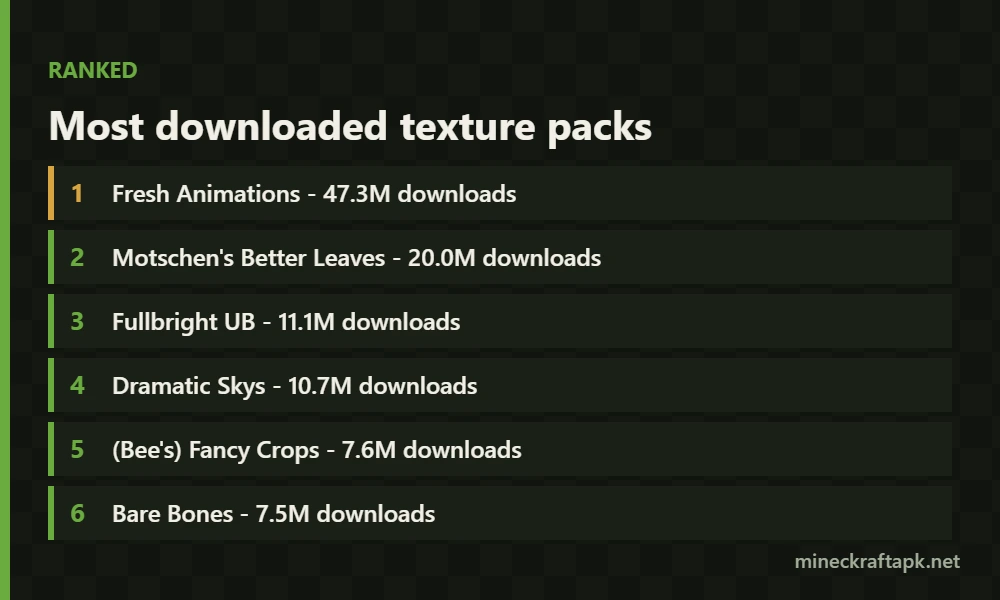
3. Fullbright UB – 11.1M downloads
By worldresourcepack. Brightens everything so caves and night-time are visible without torches. It is a practical pack rather than a pretty one – useful for mining and building, though it does flatten the atmosphere the game’s lighting creates.
4. Dramatic Skys – 10.7M downloads
By thebaum64. Replaces the sky with high-resolution clouds and reworked lighting. Sunsets and storms look genuinely different. If you take screenshots of your builds, this is the pack that changes them most.
5. (Bee’s) Fancy Crops – 7.6M downloads
By bebebea_loste. Reworks crop models so farms look like actual plants rather than flat crossed textures. Worth it if you build large farms and look at them often.
6. Bare Bones – 7.5M downloads
By RobotPants. Goes the opposite direction to high-resolution packs: it simplifies and flattens textures into a clean, bright style. The result is lighter and more readable than vanilla, and it runs well on weaker hardware.
7. New Glowing Ores – 7.5M downloads
By GridExpert. Makes ore blocks glow so they stand out in dark caves. Purely practical – it will not make your world prettier, but it will make mining faster.
8. Default Dark Mode – 7.5M downloads
By nebulr. Turns the menus and interface dark. If you play at night, this is the one that actually reduces eye strain, and it leaves the world itself untouched.
9. Faithful 64x – 7.2M downloads
By the Faithful Resource Pack team. Quadruples the texture resolution from vanilla’s 16x to 64x while keeping every texture recognisably the same. This is the pack for people who want Minecraft to look sharper without looking like a different game.
Higher resolution costs performance. If your device struggles, Faithful also comes in a 32x version.
10. Low On Fire – 15.4M downloads
By Haikis. Shrinks the fire overlay that covers your screen when you catch fire, so you can still see what is happening. A tiny change that is close to essential in the Nether.
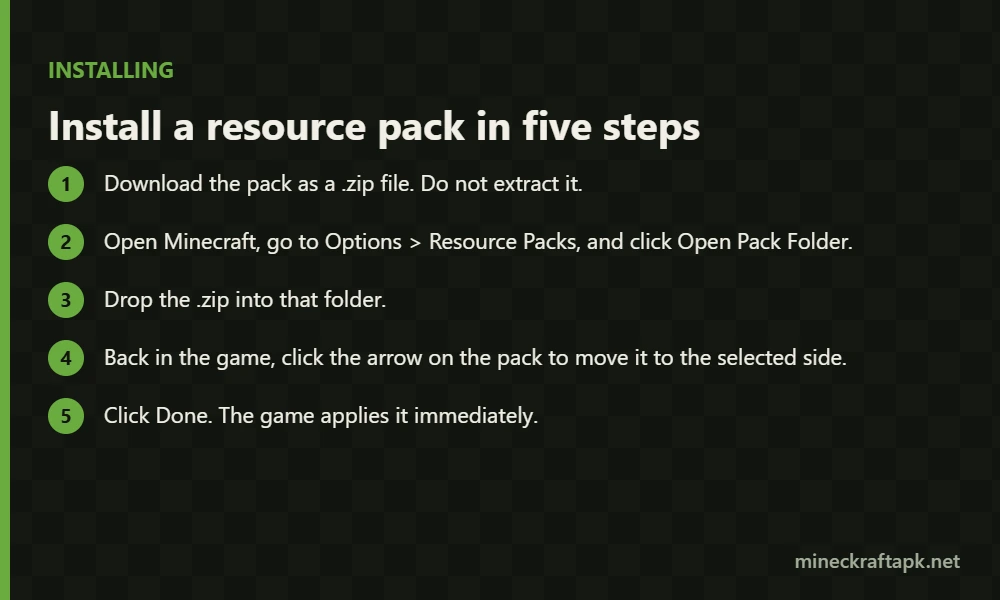
How to install a texture pack on Java Edition
- Download the pack as a
.zipfile. Do not extract it. - Open Minecraft, go to Options > Resource Packs, and click Open Pack Folder.
- Drop the
.zipinto that folder. - Back in the game, click the arrow on the pack to move it to the selected side.
- Click Done. The game applies it immediately.
Packs stack. The one at the top of the selected list overrides the ones below it, so order matters when you run several at once.
Texture packs on Bedrock Edition (Android, iOS, console)
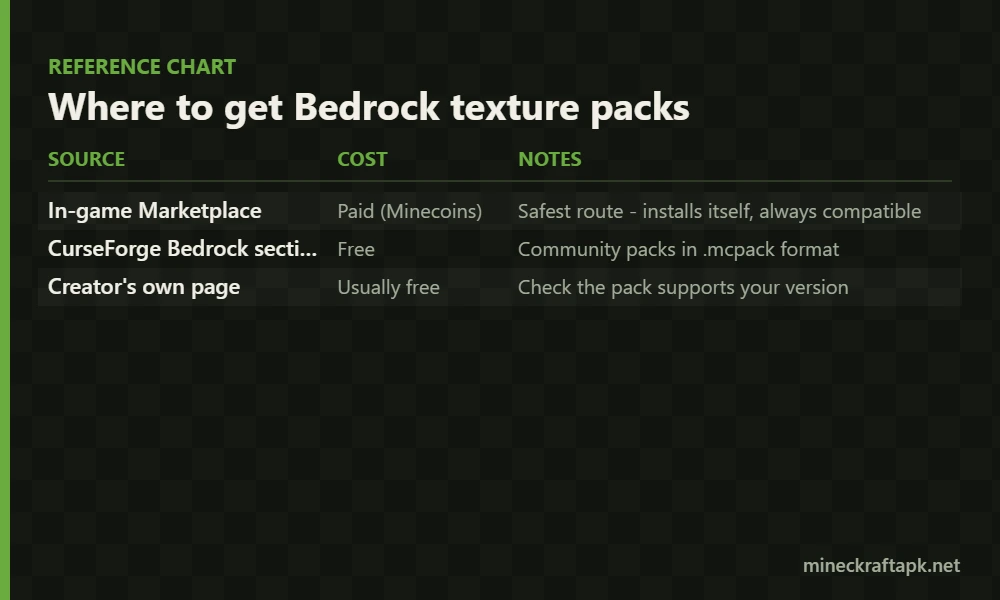
Bedrock uses a different pack format, so the Java packs above will not work. You have three routes:
| Source | Cost | Notes |
|---|---|---|
| In-game Marketplace | Paid (Minecoins) | Safest route – installs itself, always compatible |
| CurseForge Bedrock section | Free | Community packs in .mcpack format |
| Creator’s own page | Usually free | Check the pack supports your version |
To install a .mcpack file on Android, tap it and the game imports it automatically. Then enable it under Settings > Global Resources, or per-world in the world settings.
Where to download packs safely
Get packs from Modrinth, CurseForge, or the creator’s own page – these are where the authors actually publish.
Avoid sites that re-host packs they did not make. They are usually out of date, sometimes bundled with things you did not ask for, and the creator sees nothing from it. A resource pack is just a zip of images and JSON, so there is no reason to get one from anywhere other than its source.
Will a texture pack slow my game down?
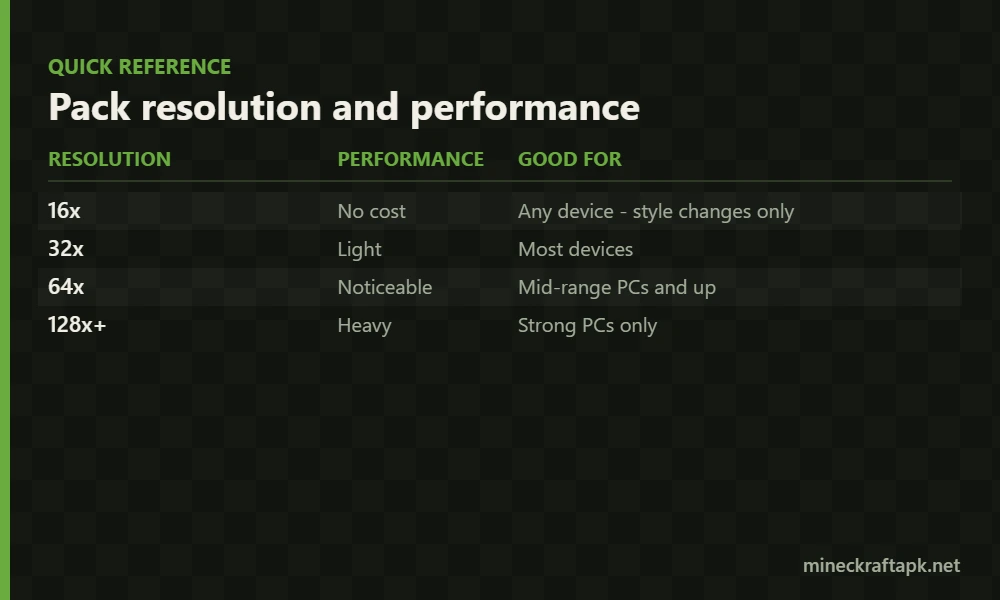
It depends on the resolution. Vanilla Minecraft is 16x. A 32x pack roughly doubles texture memory, 64x quadruples it, and 128x or higher will hurt on most phones and older PCs.
| Resolution | Performance | Good for |
|---|---|---|
| 16x | No cost | Any device – style changes only |
| 32x | Light | Most devices |
| 64x | Noticeable | Mid-range PCs and up |
| 128x+ | Heavy | Strong PCs only |
Packs like Bare Bones and Better Leaves stay at 16x, so they change the look at no performance cost. That makes them the sensible starting point on a phone or a low-end laptop.
Frequently asked questions
What is the best Minecraft texture pack?
Fresh Animations is the most downloaded resource pack at over 47 million downloads, and it changes mob animations rather than textures. For a straightforward visual upgrade that keeps the vanilla look, Faithful 64x is the usual pick.
Are Minecraft texture packs free?
Packs on Modrinth and CurseForge are free, made by community creators. Packs in the in-game Bedrock Marketplace are paid and bought with Minecoins.
Do texture packs work on Minecraft for Android?
Yes, but only Bedrock-format packs. Android runs Bedrock Edition, so Java packs from Modrinth will not work. Use .mcpack files from the CurseForge Bedrock section or the in-game Marketplace instead.
What is the difference between a texture pack and a resource pack?
They mean the same thing today. “Texture pack” is the older term; “resource pack” is current and broader, because a pack can also change sounds, fonts, menus and animations, not just textures.
Do texture packs cause lag?
Higher-resolution packs do. Vanilla is 16x, and 64x or higher noticeably increases memory use. A 16x pack like Bare Bones changes the look with no performance cost.
Can you use more than one texture pack at once?
Yes. Packs stack, and the one highest in your selected list overrides the ones beneath it. This is how people combine a full texture pack with small single-purpose packs.
Sources
Download counts, authors and version support taken from the Modrinth resource pack listing, October 2026. Always download packs from the creator’s own page or an official listing.
Related: Java vs Bedrock differences explains which edition you are on before you pick a pack format.
One Comment